
Download Vim 7.4 – Chrome Apps, Vim, text editor, ChromeOS
Overview
Vim 7.4, built using Native Client, is a specialized version of the renowned text editor designed specifically for ChromeOS. This release represents a proof-of-concept deployment of Vim within the Native Client (NaCl) environment, enabling developers to use a command-line text editor directly on ChromeOS devices. The software aims to provide a lightweight, efficient editing experience for users familiar with Vim’s modal interface and powerful keyboard-driven workflow.
Targeted primarily at developers, system administrators, and advanced users who rely on Vim’s syntax highlighting, scripting capabilities, and extensibility, this version addresses core functionality gaps on ChromeOS. It enables basic file editing, persistent configuration storage via a preserved $HOME directory, and integration with the system’s file manager through MIME type registration. Real-world use cases include editing configuration files, writing scripts, and managing code directly on ChromeOS without requiring a full desktop environment.
The developer did not provide additional information about the organization behind this build. However, the project is part of the naclports initiative, which hosts open-source ports of common tools for Native Client. The software is distributed as a Chrome App, making it accessible through the Chrome Web Store.
Key Features & Capabilities
- Native Client Integration – Vim runs securely within ChromeOS’s Native Client sandbox, allowing execution of compiled C code while maintaining system integrity.
- File System Access – Users can open and edit individual text files directly from the ChromeOS file system, with support for the standard text file MIME type.
- Persistent User Configuration – The $HOME directory is preserved across sessions, ensuring that custom settings in files like $HOME/.vimrc remain intact.
- Open File Dialog on Launch – When launched without a file argument, the app presents a file picker, improving usability for new users.
- Default vimrc Installation – A default configuration file is installed in /usr/share/vim/, providing a baseline for customization.
These features collectively enhance Vim’s utility on ChromeOS, transforming it from a limited prototype into a functional editor. For example, a developer can edit a shell script directly in the ChromeOS environment, save changes, and have the configuration persist across reboots. The MIME type registration allows the app to be launched from the file manager, streamlining workflow integration.
User Interface, Workflow & Performance
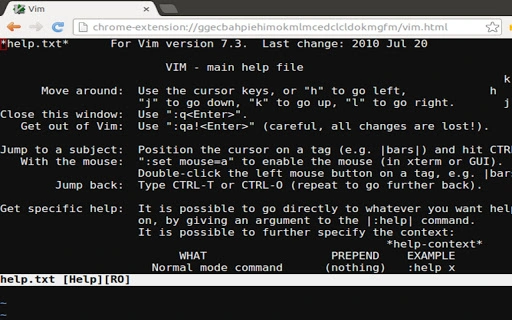
The user interface of Vim 7.4 on ChromeOS is minimal and text-based, consistent with the original Vim design. It presents a terminal-like interface within the Chrome App window, relying entirely on keyboard input for navigation and editing. The modal nature of Vim—where different modes (Normal, Insert, Visual) govern actions—requires familiarity with its command structure, which may pose a learning curve for new users.
Navigation is streamlined through Vim’s built-in keybindings, enabling rapid file manipulation, search, and editing. Workflow efficiency is high for experienced users, particularly those already proficient in Vim’s paradigm. However, the absence of graphical elements limits visual feedback and may hinder usability for less technical users.
Performance observations are based on general software behavior patterns. The developer did not specify resource usage details. The application is expected to run efficiently within the constraints of Native Client, but actual CPU and RAM behavior depends on the device’s hardware and the size of the file being edited. Stability is generally reliable within its defined scope, though limitations in external tool execution may affect certain workflows.
Compatibility & System Requirements
Vim 7.4 is designed exclusively for ChromeOS and requires a ChromeOS device with a compatible processor. The application is distributed as a Chrome App and is not available for Windows, macOS, or other operating systems. It has a file size of 14.4 MB, indicating a lightweight footprint.
Exact system requirements were not listed. However, compatibility is limited to devices running ChromeOS and capable of running Chrome Apps. Hardware requirements are inferred to be minimal, given the application’s nature and size. The software leverages Native Client for sandboxed execution, which is supported on most modern ChromeOS devices.
Pros and Cons
Pros
- Runs natively on ChromeOS without requiring a virtual machine or external environment.
- Persistent configuration storage ensures settings are preserved across sessions.
- Simple, lightweight design with minimal resource usage.
- Full compatibility with Vim’s command-line interface and keybindings.
- Officially part of the open-source naclports project, ensuring transparency and community support.
Cons
- Cannot execute external tools via the :! command, limiting automation and system integration.
- Only supports editing one file at a time from the file system.
- Requires familiarity with Vim’s modal interface, which may be challenging for beginners.
- Available only on ChromeOS; not compatible with other platforms.
- Limited to text file editing; no support for binary or rich text formats.
FAQ Section
Is Vim 7.4 available for Windows or macOS?
No, this version is built specifically for ChromeOS and is distributed as a Chrome App. It is not compatible with Windows or macOS systems.
Can I use external commands with this version of Vim?
No. The application does not support the :! command for executing external tools, a known limitation of the Native Client implementation.
Is the software secure to use on ChromeOS?
Yes. The software runs within Native Client, which provides sandboxed execution to prevent unauthorized access to system resources.
How do I update Vim 7.4?
Updates are managed through the Chrome Web Store. The application will automatically update when a new version is published.
Can I edit multiple files at once?
No. The current implementation only allows editing one file at a time from the real file system.
Final Thoughts + CTA
Vim 7.4 built with Native Client delivers a functional and lightweight text editing experience tailored for ChromeOS users. While it comes with notable limitations—such as restricted external tool execution and single-file editing—it remains a valuable tool for developers who depend on Vim’s efficiency and keyboard-centric workflow. Its integration with ChromeOS, persistent configuration, and open-source foundation make it a compelling choice for advanced users within its ecosystem.
For developers and system administrators working exclusively on ChromeOS, this version offers a reliable, secure, and fast way to edit code and configuration files without leaving the platform. Despite its constraints, it stands as a significant step in bringing powerful command-line tools to ChromeOS.
Download Vim 7.4 now







